A few months ago, we shipped a music practice app called BeSur. It's a Flutter codebase across iOS and Android, and the engineering challenge that shaped almost every decision in it was audio - specifically, getting the audio system tight enough that practising musicians wouldn't notice the seams.
The case study covers what BeSur is. This post is about how we built the parts that don't show up in screenshots: the audio engine, the asset delivery pipeline, the rendering loop. The decisions, the tradeoffs, and one or two things we'd do differently.
If you're building anything where audio fidelity, timing precision, or large-asset delivery matters on mobile, you'll recognise these problems. The frameworks won't carry you the whole way. Here's where we ended up.
Why the obvious tools weren't enough
Mobile audio tooling is mature, and for most apps it's plenty. just_audio, audioplayers, flutter_sound - they all play files, support streaming, expose volume and seek and stop. We started there.
Three things broke.
Latency on tempo changes. When the user adjusts playback speed mid-session, the audio has to respond on the next musical bar - not in 200 ms, not in "soon". High-level sample players treat tempo as a request to be queued; in our context, tempo is a property of musical time, and time has to keep flowing through the change.
No shared timing authority across simultaneous tracks. Several audio sources play in parallel. If each has its own playback head, they drift relative to each other within seconds. There has to be one clock, and every track has to be subordinate to it.
MIDI-style synthesis, not just sample playback. We needed to drive a SoundFont (.sf2) instrument with arbitrary note triggering and per-session pitch shifting - not pre-rendered audio files, but live synthesis from an instrument bank, on a phone.
“Whether something feels like music depends on how you handle drift, not on which library you picked.”
The combination - synthesis, multi-track coordination, low-latency response - is the territory of a desktop DAW. We were building a phone app. So we built our own engine, sized for the constraint.
The architecture, in three layers
The audio system is three components, and almost every other feature in the codebase depends on them in some form:
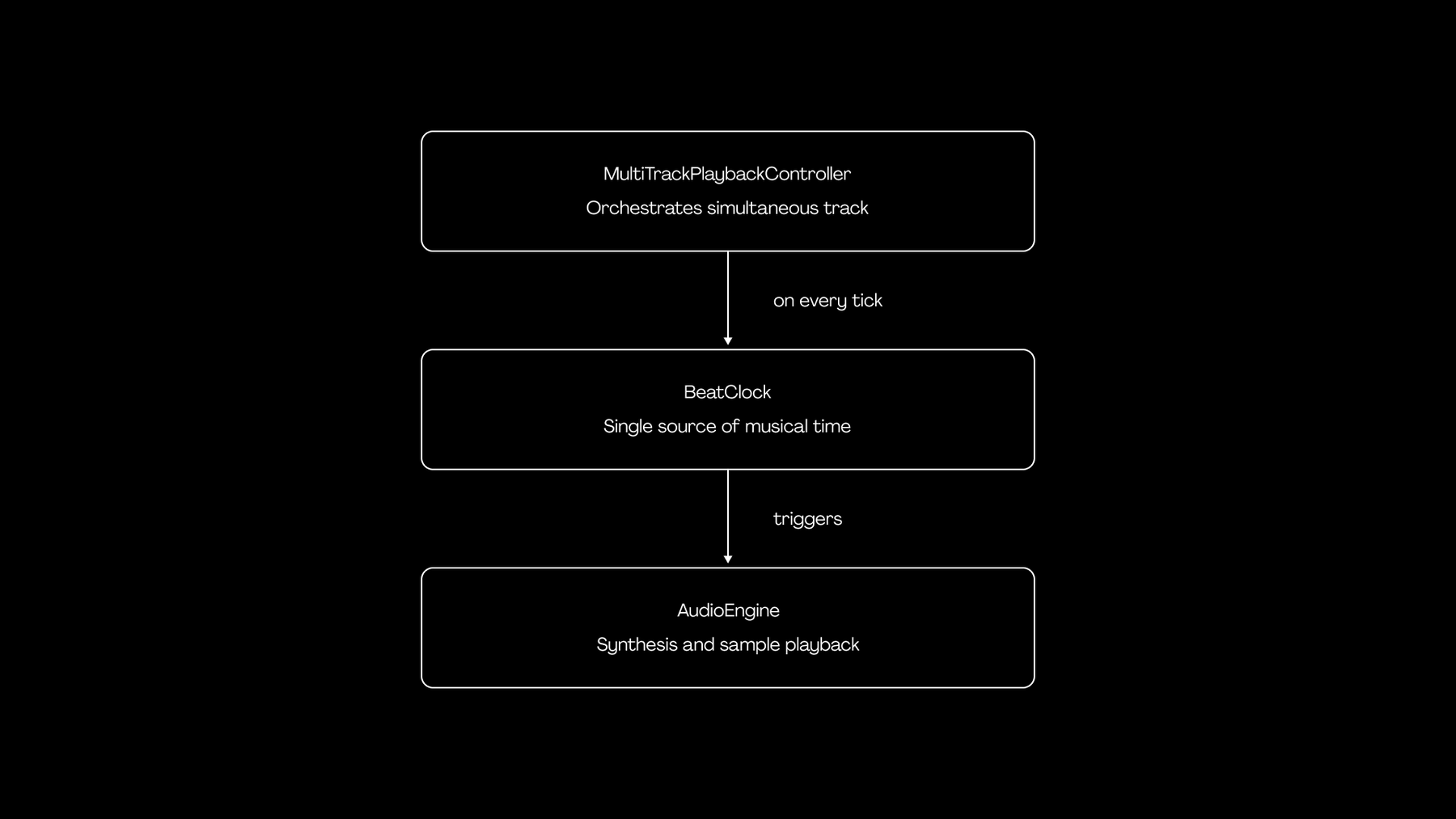
BeatClock is the rhythmic authority. AudioEngine doesn't know what a beat is - it knows how to play a note or a sample. MultiTrackPlaybackController is where scheduling happens: which track plays what, at which beat, given the current session state.
The pattern (clock → transport → mixer) is a 50-year-old idea from analog studios. The interesting work was applying it cleanly inside a Flutter app on Dart's single-threaded event loop, with honest tradeoffs about where to relax it.
BeatClock: making 16 milliseconds feel like infinity
The clock is shorter than you'd expect:
class BeatClock {
  double _bpm;
  DateTime? _startTime;
  Timer? _timer;
  double currentBeat = 0.0;
  void Function(double currentBeat)? onTick;

  void start() {
    _startTime = DateTime.now();
    _timer = Timer.periodic(
      const Duration(milliseconds: 16),
      (_) => _tick(),
    );
  }

  void _tick() {
    final elapsed = DateTime.now().difference(_startTime!);
    final elapsedSeconds = elapsed.inMilliseconds / 1000.0;
    currentBeat = (elapsedSeconds / 60.0) * _bpm;
    onTick?.call(currentBeat);
  }
}
Two design choices are buried in those few lines.
Choice one: derive currentBeat from wall-clock deltas, not from accumulating tick counts. A naive implementation increments a counter on every tick, multiplies by tick duration, and calls it good. That works for about thirty seconds. Then Timer.periodic slips - Dart timers are not real-time guarantees, especially on Android with Doze mode lurking - and your "playback" is now ahead or behind reality by a perceptible amount. By recomputing from actual elapsed wall time on every tick, drift becomes a non-issue. The cost is one DateTime.now() call every 16 ms, which is free at this scale.
Choice two: tick at 60 Hz, not at the audio rate. A real DAW schedules audio events ahead of time against the audio buffer's sample clock, sometimes with sample-level (44.1 kHz) precision. We don't need that. The use case tolerates ±10 ms scheduling slop without anyone noticing. A 60 Hz visual-rate tick gives us 16 ms scheduling resolution, which is tight enough, and it pairs naturally with Flutter's 60 fps render loop so the visual UI stays in lockstep with the audio.
Was this perfect? No. If we ever extended into bidirectional rhythmic interaction (where the app has to detect the user's timing and respond on the same beat), we'd want a proper audio-clock-driven scheduler that pre-queues events into the audio buffer. For the practice context this app targets, the simpler clock is the right tool.
“A 16-millisecond periodic timer is a primitive. Whether it feels like music is a function of what you build on top of it.”
Shipping 200 MB of audio without breaking first-run UX
The audio engine is the visible engineering work. The asset pipeline is the invisible one - and it's the one that almost killed our launch.
The app needs SoundFont files for synthesis, drone recordings, metronome samples, and a curated audio library that grows over time. All in: north of 200 MB, expanding with every content update.
You have three options for delivering that:
- Bundle everything in the app binary. Simple for engineers. Disastrous for the user - first download balloons past 250 MB on cellular, app store rankings suffer, and every release pushes the entire bundle.
- Download everything on first launch. Smaller install, but first-run UX becomes "wait three minutes before you can do anything." For a learning-curve product, that's a death sentence.
- Bundle a critical subset, stream the rest, handle the gradient between them.
We picked option three. The implementation is more interesting than it sounds, because the gradient is where all the bugs live.
The manifest
A versioned manifest.csv lives on a CDN. It enumerates every asset the app could need: relative path, expected size, content hash, last-modified timestamp. The app also ships with a bundled copy of an older manifest, so a fresh install with no network can still operate on a meaningful subset.
On startup, the manifest service does this:
- Try to download the latest manifest from the CDN. Cache it locally (we use Hive).
- On failure, fall back to the bundled manifest.
- Parse it (with a UTF-8 BOM strip - yes, that bug existed; yes, we have a test for it now).
- Hand the parsed entries to a cache index, which reconciles them against what's actually on disk.
The downloader
A separate service is responsible for actually pulling files. It's lazy - when a feature requests a file that the manifest says exists but the cache doesn't have, the download starts on demand. It writes to a .tmp file and renames on success; if the connection drops mid-download, no half-corrupted asset sits on disk pretending to be valid. It also distinguishes 403s and 404s from server errors, because "this asset isn't available on this account" and "the CDN is down" deserve different UX treatments.
The resolver
The piece we're most proud of is the resolver. When any feature in the app needs an asset path, it asks the resolver. The resolver does this:
asset request
   │
   ▼
is there a downloaded copy on disk?
   │
   ├─ yes → return downloaded path
   │
   └─ no → is it bundled in the app?
            │
            ├─ yes → return bundled path
            │
            └─ no → throw (caller decides)
The features upstream don't know - and don't care - whether they're playing a freshly downloaded file or a year-old bundled one. They get a path that works. This small abstraction bought us the most freedom over the project's life: we could change asset hosting, restructure the bundle, swap in larger files, all without touching the playback code or any feature module.
“The right architecture isn't the most clever one. It's the one a four-person team can still hold in their heads at month nine.”
In dev mode, the resolver short-circuits to bundled assets so engineers don't accidentally test against stale CDN state. In production, it prefers the network-fresh copy. That asymmetry took us about a week to articulate cleanly, and it's now one of the parts of the codebase we point new engineers at when explaining how the project thinks.
Custom-painter rendering: 60 fps on a five-year-old phone
The audio engine is the soul. The animated note view is the face. Visual elements stream from a vanishing-point horizon down toward an interactive surface, accelerating as they approach a hit line. The user reads them in real time as the audio plays.
The naive approach is one Flutter widget per element. This works for a screen with 20. It dies at 200. The Flutter widget tree wasn't designed for hundreds of frequently-rebuilding nodes representing transient visual state.
We use a single CustomPainter that draws every visible element in one paint pass. The painter receives a list of objects, the current beat, and the canvas size. On every frame it does roughly this:
- Binary-search to find the first visible element. The list is pre-sorted by start time, so we never iterate elements that are below the horizon or already past the hit line.
- Apply a perspective transform per element. Each is positioned in a 2D virtual space (lane, beat). We map that to a screen-space trapezoid using the surface's vanishing-point geometry - wider at the bottom, narrower at the horizon. This produces a 3D feel without booting up a real 3D engine.
- Draw back-to-front, so closer elements occlude farther ones correctly.
- Skip everything we can. Anything whose end time is below zero relative to the current beat is off-screen below; anything whose start time is past
currentBeat + visibleBeatshasn't entered the window yet.
The full painter is around 200 lines. It runs at 60 fps on a five-year-old Android with no measurable jank, because the work-per-frame is bounded by the number of visible elements - usually fewer than 30 - not by total content length.
This is a pattern we keep reaching for: when state-driven widget trees would be the cleanest abstraction but the wrong performance shape, drop one level down to the canvas and pay for it once.
Architectural choices that paid off (and one that didn't)
For the longer-arc decisions - the things that don't show up in any one file but shaped the whole codebase - here's the after-action review.
BLoC + get_it for state management and DI. Right call. BLoC's strict event/state separation is overkill for a counter app and exactly enough for a multi-feature production app. Combined with get_it as a service locator, it kept feature folders genuinely independent - each owns its state and depends on shared services through DI, not on each other.
Hive over SQLite. Right call. Persistence needs were 95% key-value: cache index, manifest snapshots, user preferences, session state. Hive's typed boxes and code-generated adapters give us type-safe persistence with about a quarter of the ceremony. The 5% case where a real query language would have helped, we handled with in-memory filtering on a small dataset.
go_router for declarative routing. Right call, made later than we should have. As the app grew past five screens with parameterised routes, imperative navigation became unmanageable. Migrating to go_router was a two-day refactor that paid back within a sprint.
Deferred instrument loading. Wrong call. We loaded SoundFonts on the first session start, not at app launch - reasoning that not every user reaches that screen, so why pay the cold-start cost for everyone? In retrospect, that just shifted the latency: users tap "Start," then wait a beat for instruments to load before they can do anything. The right answer is progressive warm-up - load the most common SoundFont in the background after the home screen settles, then the rest opportunistically. We've designed the change; we haven't shipped it. It's one of those tradeoffs where the engineering instinct ("don't do work you might not need") was at odds with the product instinct ("the moment of intent is the moment to be ready").
What this taught us about building for niche, demanding domains
Generic mobile patterns assume generic users. They assume tolerance for 200 ms latency, "good enough" rhythm, "just download everything on first launch" UX, the kind of state churn that a chat app or a feed reader treats as background noise.
Practitioner-grade products don't grant those assumptions. Whether you're working on a music tool, a flight simulator, a clinical workflow, or professional audio gear - the domain comes with constraints baked in by years (sometimes centuries) of human practice, and the engineering has to meet them.
The lesson, repeated three or four times across the project's lifecycle: when you're building for a domain you don't personally inhabit, your job is to make decisions that respect what the practitioners already know. That sometimes means writing a custom audio engine when an off-the-shelf one would suffice for everyone except the people you're actually building for. It means caring about a half-beat of drift even when the spec didn't mention it. It means treating the smallest UX papercut from a domain expert as the most important bug report you'll get all year.
The technical bar is higher because the cultural bar is. That's the whole story.
If you're building something that has to feel right to people who know better than you do, and you've hit the ceiling of generic frameworks, we'd love to hear about it. Brewnbeer is a small team, by design - small number of projects, full senior depth, end to end. The depth is the point.